Chrome extension
Save a web page as Markdown you do not have to clean up
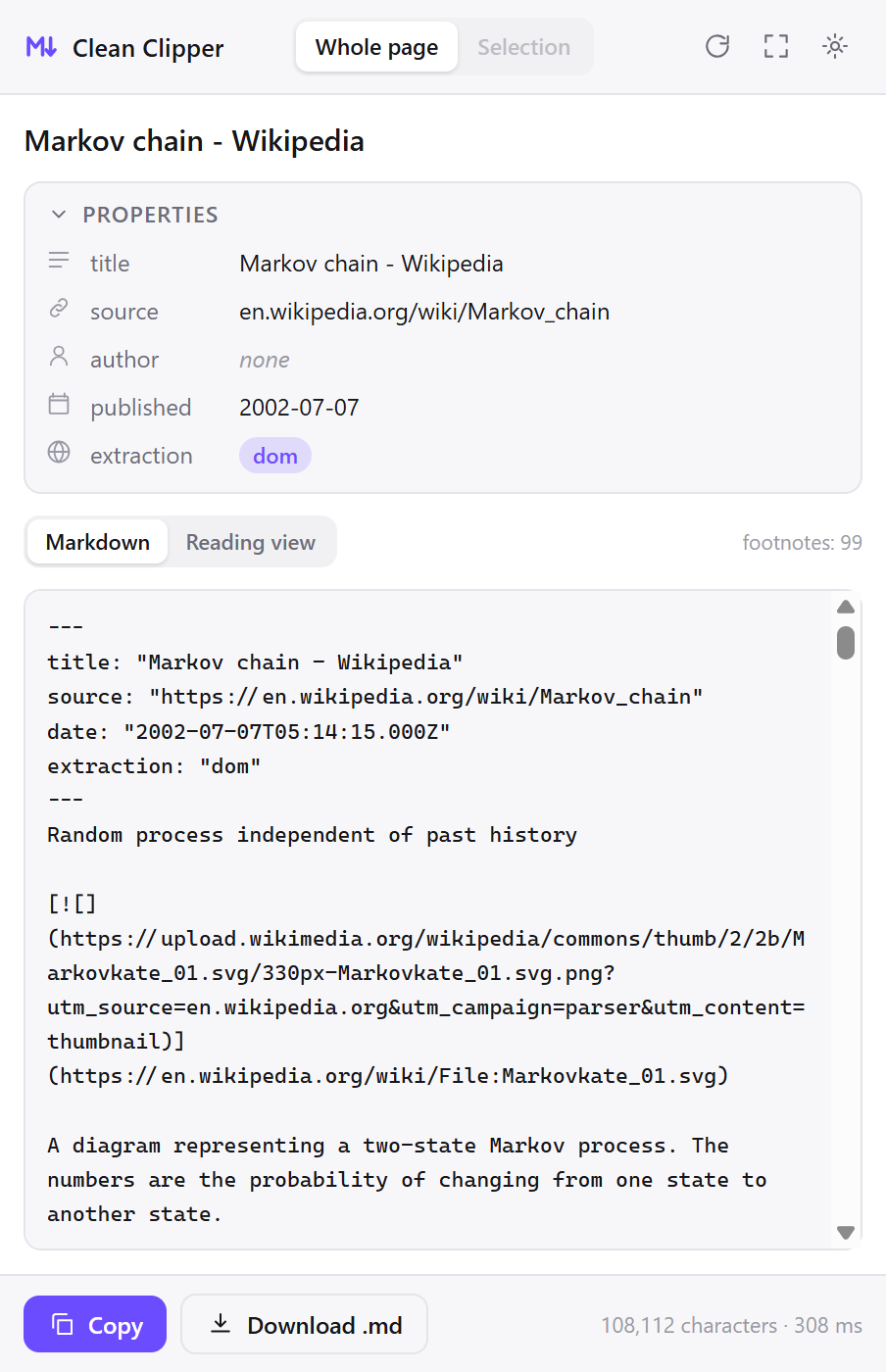
Click the icon and the clip is already there – title, author, publication date and source collected into the frontmatter, the body stripped of navigation. Everything happens inside your browser: no account, and nothing you clip is uploaded anywhere.
The problem is never the conversion. It is everything that comes with it.
Every clipper turns HTML into Markdown. Then you open the note and find the cookie bar, the sidebar menu, a “read next” list, and a table that fell apart on the way in. Clean Clipper is built around removing exactly that, and the removal is measured rather than claimed.
what other clippers keep
[Skip to content](#main) [Log in](/login) [Sign up](/register)
[Home](/) [News](/news) [Sport](/sport) [Culture](/culture) [More](/more)

We use cookies and similar technologies to improve your experience.
[Accept all] [Manage preferences]

# The article you came for

Actual first paragraph of the text.

<div class="promo-inline">

## Read next
[Another headline](/a) [One more headline](/b) [And a third](/c)
what ends up in the note
# The article you came for

Actual first paragraph of the text.
What makes the output clean
- Code keeps its language. You get a fence tagged
js, not a bare one, so highlighting works the moment you paste. - Tables stay whole. A cell holding code or a list no longer breaks the row.
- Footnotes actually work. Reference links become
[^1]with definitions at the end of the note, not dead anchors. - Dates are read, not guessed. JSON-LD,
article:published_time,citation_date(the arXiv / PubMed / IEEE standard),time[datetime], Unix stamps. No date on the page means an empty field – never today’s date. - Menus, banners and “read next” get cut. Logo strips, paginators and navigation repeated in every section never reach the note.
- Not one leftover tag. No
divortablemarkup stranded in the middle of your text.
---
title: "Markov chain - Wikipedia"
source: "https://en.wikipedia.org/wiki/Markov_chain"
date: "2002-07-07T05:14:15.000Z"
extraction: "dom"
---

A Markov chain is a stochastic process describing a sequence of possible
events in which the probability of each event depends only on the state
attained in the previous event.[^1]

[^1]: Gagniuc, Paul A. (2017). Markov Chains: From Theory to Implementation
      and Experimentation. USA, NJ: John Wiley & Sons. pp. 1-235.
Measured on 512 pages from the world’s most-visited sites
Two runs. The first took 109 pages from the hundred most-visited sites in the world and in Russia and compared the output against three other extraction engines. The second took the top fifty sites in each of twelve European countries: 403 more pages, each captured in the country’s own language.
Where it saves
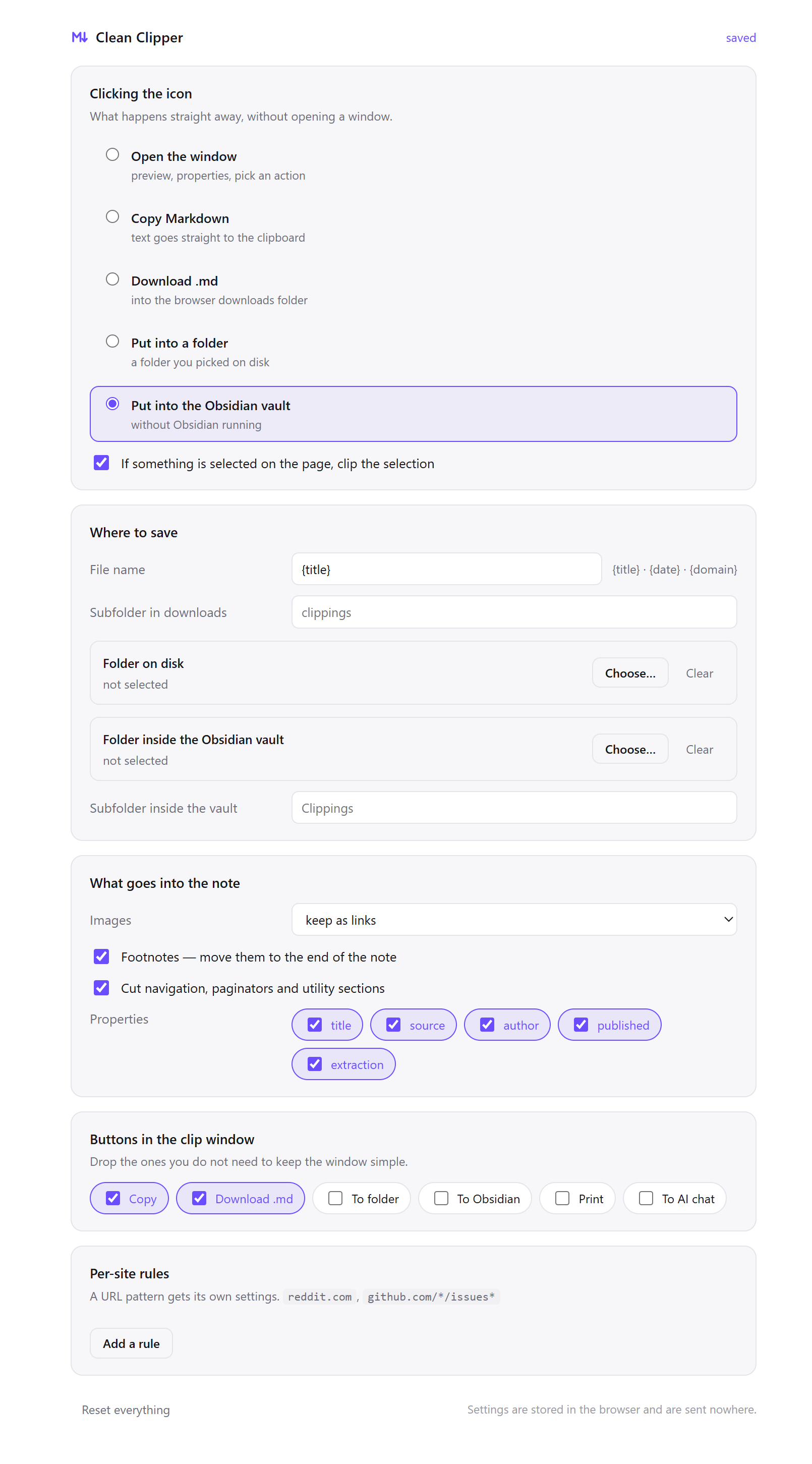
- Copy the Markdown to your clipboard
- Download the
.mdfile - Write into a folder you picked on disk
- Write straight into your Obsidian vault – no plugin, no local REST API, no URI scheme; the file simply appears
The icon click is configurable. Leave it as a preview window, or make one click drop the note into your vault and open nothing at all.
Honest about the source
Every note is stamped with an extraction field. dom means the text came from what the browser actually rendered. jsonld-articlebody means the page never finished rendering and the body had to be read from the page’s own structured data. And when there is no article on the page at all – a storefront, a feed, a search result – the extension says so instead of dumping three hundred links on you.
Fifteen ways people use it
DevelopersCode fences keep their language tag, so pasted documentation is highlighted the moment it lands.
Clean Clipper reads the language off the page: from the fence class, the parent element or the highlighter’s own markup, and writes it into the fence. On a nine-page technical corpus the tag survived in 73 of 156 fences, against 20 and 0 for the two engines compared.
- The fence comes out tagged. ```js, not bare – highlighting works in Obsidian, VS Code and GitHub the moment you paste.
- The language is read, not guessed. It comes from the class the site’s own highlighter left behind, so the tag is as correct as the source page.
- Tables with code in a cell stay whole: 12 of 15 kept on the technical corpus, against 7 for each engine compared.
Obsidian usersPick a folder inside the vault once; one click writes the note there, with Obsidian closed.
Clean Clipper writes the .md file into your vault itself, through the browser’s File System Access API. There is no community plugin, no local REST server and no obsidian:// link in the chain, and Obsidian does not have to be running for the note to arrive.
- No plugin, no local server, no
obsidian://links – the browser writes the file into the folder you granted. - Obsidian does not need to be open. The note is simply there the next time it is.
- YAML frontmatter with
title,source,author,dateandextraction– and you pick which of those to keep.
AI and LLM contextA page’s repeated navigation is billed context. It is removed before the text reaches the model.
On a 109-page corpus Clean Clipper left 102 duplicated navigation lines where three other extraction engines left 282, 478 and 491 – and no leftover HTML tags at all. What reaches the model is the article plus a frontmatter header naming the source URL and the publication date.
- Roughly four times less duplicated navigation than the average of the engines compared: 102 repeated lines against 282, 478 and 491.
- Zero leftover HTML tags across 512 measured pages: nothing for the model to parse around.
- Frontmatter states the source URL and the publication date, so a claim can be attributed rather than guessed at.
ResearchersReads citation_date (the tag arXiv, PubMed and IEEE emit) and turns references into footnotes.
A saved paper without its publication date is a citation you have to reconstruct later. Clean Clipper reads the date from the page’s own metadata rather than from the running text, and when a page carries no date the field stays empty instead of being filled with today.
citation_dateandcitation_publication_date(the meta tags arXiv, PubMed and IEEE emit) are read directly.- Also JSON-LD
datePublished,article:published_time,time[datetime]and Unix timestamps, in that order of preference. - No date on the page means an empty field – never today’s date.
StudentsClip lectures, chapters and reference pages into Markdown files that outlive the course login.
Course material disappears when the term ends: links rot, the module page is archived, the seminar reading moves. Markdown files on your own disk do not, and they open in any editor a decade from now with the source URL still inside them.
- Select a passage and only the selection is clipped – the way to take one definition without the page around it.
- Every note carries the source URL, so citing it later takes no searching.
- A reading view shows the clip as ordinary text, without Markdown symbols, before you save it.
WritersTitle, author, publication date and source URL travel with every clip, so a quote keeps its origin.
Research collected as screenshots and bookmarks stops being usable at the moment you need to attribute it. A Markdown file keeps the title, the author, the date and the address in the same file as the text, where a fact-check can reach them.
title,author,dateandsourcein the frontmatter of every note, so attribution lives with the text.- The author field is filtered: section headings, publication names and button labels are not treated as bylines.
- Article body only: newsletter boxes, share bars and “read next” strips never reach the note.
JournalistsThe text as you read it, with its publication date and address, in a file on your own disk.
Pages are edited and taken down. A clip holds the full text, the source URL and the publication date the page itself declared, in a plain file you keep: not in a service that can close, change its terms or quietly lose the record.
- Publication date read from the page’s own metadata – JSON-LD,
article:published_time,time[datetime]– not from the running text. - The source URL sits in the frontmatter of every note.
- Full article text without the navigation and promo blocks that change between visits.
Legal workThe text as published, with the source address and the date, in a file you control.
Regulations, terms of service and official guidance change without notice. A Markdown copy carrying the address it came from and the date the page declared is a record of what the text said on the day you read it.
- Verbatim text – nothing inside the article body is summarised, rewritten or reordered.
- Source URL and the page’s declared publication date in the frontmatter of every note.
- Tables of fees, deadlines and thresholds are serialised by the extension itself: 12 of 15 kept on the technical corpus, against 7 for each engine compared.
AnalystsA cell holding code, a list or a link no longer breaks the row: 12 of 15 tables kept.
Generic HTML-to-Markdown converters break on the tables that matter: the ones with a list, a link or a code sample inside a cell. Clean Clipper serialises the table itself and flattens the cell content instead of dropping the row.
- A GFM table serialiser written for this, not a generic converter plugin bolted on.
- 12 tables of 15 kept on the technical corpus, against 7 for each engine compared.
- Ragged two-column tables become bold key and value lines instead of a broken grid.
TeachersThe material without the site around it: no menus, no consent bar, no adverts on the printed page.
A page printed straight from the browser brings its menus, its consent bar and its adverts onto the handout. Clipping brings the text, with the source URL kept inside the file so attribution takes no extra work.
- A print button that prints the clip, not the page around it.
- The reading view shows the result as ordinary text, without Markdown symbols, before you print or save.
- Select one exercise or one definition and clip only that.
TranslatorsMenus, banners and repeated navigation never reach the segment list.
Source text pasted from a web page brings navigation with it, and every menu item becomes a segment you have to skip, count and eventually explain on an invoice. Clean Clipper removes it before the file gets anywhere near your tool.
- Menus, paginators, consent bars and “read next” feeds are cut before the file exists.
- Duplicated navigation reduced roughly fourfold against the engines compared: 102 repeated lines against 282, 478 and 491.
- Not one leftover HTML tag across 512 measured pages, so no stray markup turns into an inline tag.
Product managersClip changelogs, docs and release notes into files you can search, diff and cite.
Competitive research kept as bookmarks decays into a list of links you cannot search. Clipped into Markdown it becomes a corpus you can grep, diff against last quarter’s capture, and quote in a decision document with the date attached.
- Publication date read from the page, so a changelog entry keeps its real timing rather than the day you found it.
- Per-site rules route each competitor into its own folder automatically.
- Pricing and limits tables survive: 12 of 15 kept on the technical corpus, against 7 for each engine compared.
Technical writersHeadings, tables, code fences and footnotes come across; the site’s chrome does not.
Migrating documentation usually means converting the HTML and then spending longer removing what the converter kept. The removal is what Clean Clipper was built around, and the part that was measured: zero leftover HTML tags across 512 pages.
- Headings, lists, tables, code fences and footnotes all map to standard Markdown.
- Code fences keep their language tag: 73 of 156 kept on the technical corpus, against 20 and 0 for the engines compared.
- Zero leftover HTML tags across 512 measured pages.
Personal archivePlain Markdown files on your own disk. No account, no service, nothing that can shut down.
Bookmarks point at pages that change or disappear, and read-later services close, get acquired or start charging for the export. A clip is the text itself, in a format with no vendor and no expiry, stored where you decide.
- A durable, open format: plain text with YAML frontmatter, readable by any editor and by
grep. - No account and nothing uploaded: what you clip stays on your own disk.
- Publication date and source URL captured with the text, so a note is still identifiable years later.
Reading without the noiseA reading view with no menus, no banners and no Markdown symbols, in your browser’s own theme.
Page furniture is not only visual clutter – it is text a screen reader announces and a reader has to skip past on every visit. The clip window shows the article on its own, in your browser’s light or dark setting, with no page scripts running.
- The reading view renders the clip as ordinary text – without Markdown symbols, with working links and real headings.
- It follows your browser’s light and dark setting, not the site’s.
- The window expands to about three quarters of the screen for a longer article.